

How-To Series on MVC, jQuery, JSON, Paging and mapRoute

Download Source Code
Introduction
Due to the large amount of data in database systems, client-side work has become very important. In the classic ASP.NET code-behind approach, the natural method is to code most of the work in code-behind files using ASP.NET components. Moreover, rendering of ASP.NET components and the viewstate mechanism are now considered weak capabilities of classic ASP.NET.
Therefore, a new paradigm has emerged. According to this new paradigm, the developer can work with pure HTML and JavaScript without viewstate that degrades performance and with less rendering.
Although MVC is known as an old design or architectural pattern, it has become popular especially after the classic ASP.NET bottlenecks mentioned above. High-performance applications can be developed in MVC where jQuery and JSON are used effectively.
Background
This article may be useful after reading some beginner-level articles about MVC, jQuery, and JSON. The following links may be helpful for beginners:
Using the Code
In this article, a "how-to series" is intended. Therefore, all scripts are given from the attached source code. Actually, each "how-to" could be a separate article. Anyway, all possible answers are collected in a single example. There are practical approaches rather than theoretical knowledge in this article. For example, some static lists are used instead of a database for simplicity.
The following questions are answered:
- How to do CRUD with good performance in MVC?
- How to use jQuery dialog instead of JavaScript confirm or alert?
- How to do paging in MVC list?
- How to make "show more" link in MVC using jQuery?
- How to use attribute with link?
- How to make AJAX call in jQuery?
- How to use Form collection in MVC?
- How to delete multiple records at once?
- How to use partial action in MVC?
- How to use JSON format in MVC application?
- How to fill master-detail combobox?
- How to use jQuery datepicker?
- How to upload image in MVC with jQuery dialog?
- How to create table row on client side?
- How to customize mapRoute in Global.asax?
- How to checkALL and uncheckALL all rows of a table?
- How to do "Loading Data"?
- How to make master-detail grids with jQuery?
1) How to do CRUD with good performance in MVC?
Roughly speaking, all business solutions have Create-Read-Update-Delete capability. If possible, using the same "save form" for both "insert" and "update" can be cost-effective for the developer. Using the same form is possible by managing the parameters sent to the action.
Assume you have a grid-like list (actually an HTML table) and a separate "new" button in the form. Each row of the table has an "edit" and "delete" button related to that row.
Redirecting to a new page - called view here - after clicking "New" is not an efficient way. Because after the data is saved on the redirected page, the user needs to click "show list" to see the data added to the database. This means redirecting to the list view and selecting data from the database with the cost of variable selection!
Instead of the "click new and relist" scenario expressed above, a better way can be implemented.
Create:
- In the list view, a "jQuery Save dialog" can appear after clicking "New".
- The Create view is rendered to jQuery dialog.
- The Create form is filled and "Save" is pressed.
- When the Save button is pressed, data can be sent to the related controller with AJAX post.
- The Ajax form has
onSuccessJavaScript function. - In the "
onSuccess" JavaScript method, the newly added row is prepended to the beginning of the list with the JSON coming as a parameter to "onSuccess", without refreshing the entire list.
Read:
This is a listing operation. If possible, only necessary data should be shown in the list form. The following techniques can be used:
- paging with combobox or numbers,
- "show more" implementation,
- listing with filtering.
Update:
- In the list view, after clicking "Edit" on any row of the list, the same "jQuery Save dialog" can appear with the selected row's data.
- Since all steps are the same as "Create", only the "
onSuccess" method is changed according to the "update" operation. - In this case, after the database update, only the data in the edited row is updated in the view. This way, there is no need to refresh the entire list to see the last edited record.
Delete:
- After confirmation with a nice-looking jQuery dialog, after database deletion, only the selected row is removed from the list. Again, there is no need to refresh the entire list.
The same dialog is used for both insert and edit.
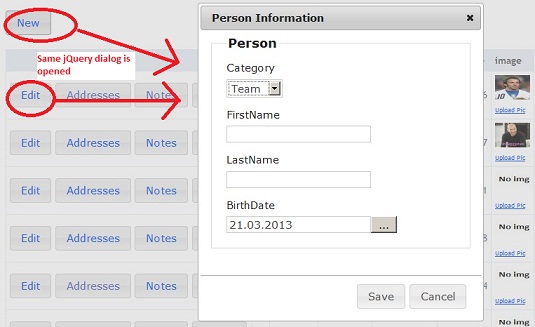
PersonList.cshtml view's links are as follows:
HTML
@Html.ActionLink("New", "Save",
  new { personNo = 0 }, new { @class = "newLink" })

...

@Html.ActionLink("Edit", "Save", new { personNo = item.PersonNo }, new { @class = "editLink" })
- New: Text to be displayed.
- 0: Action parameter for Save.
- personNo: Parameter sent to the "Save" action. If 0, the dialog opens empty; if greater than 0, data for that id is shown in the dialog.
- newLink: Imaginary className to be used in the jQuery below.
JavaScript
<div id="saveDialog" title="Person Information"></div>

<script type="text/javascript">

    var linkObj;

    //.....

    $(document).ready(function () {

       //...

        $('#saveDialog').dialog({
            autoOpen: false,
            width: 400,
            resizable: false,
            modal: true,
            buttons: {
                "Save": function () {
                    $("#update-message").html('');
                    $("#savePersonForm").submit();
                },
                "Cancel": function () {
                    $(this).dialog("close");
                }
            }
        });


       //....

       setLinks();

    });

    // ....

    function setLinks()
    {

        $(".editLink, .newLink, uploadPicLink").unbind('click');

        $(".editLink, .newLink").click
        (
            function ()
            {
                linkObj = $(this);
                var dialogDiv = $('#saveDialog');
                var viewUrl = linkObj.attr('href');
                $.get(viewUrl, function (data)
                {
                    dialogDiv.html(data);
                    //validation
                    var $form = $("#savePersonForm");
                    $form.unbind();
                    $form.data("validator", null);
                    $.validator.unobtrusive.parse(document);
                    $form.validate($form.data("unobtrusiveValidation").options);

                    dialogDiv.dialog('open');
                });

                return false;

            }
        );

        //...


    } //end setLinks
</script>
The Save action in
PersonController is as follows:C#
// ...

[HttpGet]
public ActionResult Save(int personNo)
{

  Person person= new Person();
  person.BirthDate = DateTime.Today;
  person.PersonNo = 0;

  if (personNo > 0)
  {
     person = Repository.GetPersonList().Where(c => c.PersonNo == personNo).FirstOrDefault();
  }

  return PartialView(person);

}

 // ...

[HttpPost]
public JsonResult Save(Person p)
{
     //...
}

// ...
2) How to use jQuery dialog instead of JavaScript confirm or alert?
Customized message box is possible in Windows applications. It is also possible when using third-party component libraries for the web. It is also possible to use jQuery dialog instead of JavaScript boxes as follows:
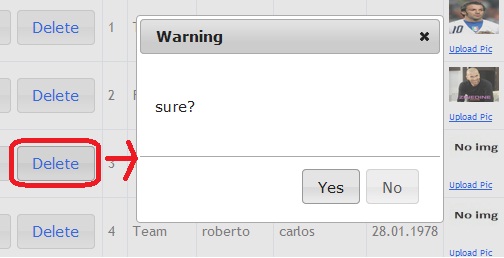
The Delete link in the
PersonList view is as follows:HTML
@Html.ActionLink("Delete", "DeletePerson", new { personNo =
item.PersonNo }, new { @class = "deleteLink", @pkNo = item.PersonNo })
HTML and jQuery code is as follows:
JavaScript
<div id="confirmDialog" title="Warning"></div>

<script type="text/javascript">
//...

 $(".deleteLink").live("click", function (e) {
        e.preventDefault();

        // ..

        $("#confirmDialog").html('<br/><br/>sure?');

        $("#confirmDialog").dialog({
            resizable: false,
            height: 200,
            width: 300,
            modal: true,
            buttons: {
                "Yes": function () {
                    // ..

                 }, // end of yes button
                "No": function () {
                    $(this).dialog("close");
                }
            } //end buttons
        }); //end modal
    });     //end delete

//...
</script>
3) How to do paging in MVC list?
Paging is one of the good approaches for listing data and minimizing data transfer cost. Many ways of displaying data can be implemented. In this "how-to", a combobox is used for paging. However, if desired, numbering at the bottom of the page is also possible. This depends on the application and the developer. Paging with combobox can be developed as follows.
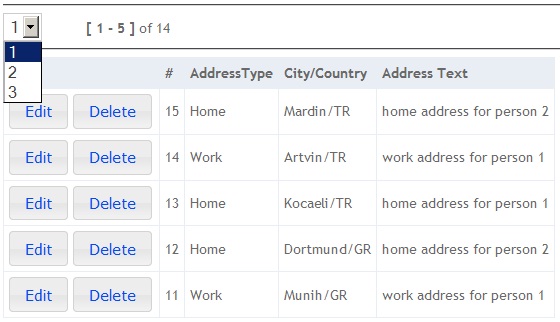
First, the place for paging metadata is arranged as follows:
HTML
@model AddressBook_mvc3_jQuery.Models.Paginginfo

...

<div id="paginginfo">
<hr />
    <select id="PageSelect"></select>

    <span class="pagingPersonNo" style="visibility:hidden">@Model.id</span>
    <span class="pagingTotalCount" style="visibility:hidden">@Model.TotalCount</span>
    <span class="pagingPageSize" style="visibility:hidden">@Model.PageSize</span>

    <span class="pagingSummary">aaa</span>

<hr/>
</div>

<div id="content"></div>

...
When the page is first loaded, the div with id "
paginginfo" is filled and the first page of records is displayed using the following scripts.JavaScript
<script type="text/javascript">

//...

  function initializePaging()
  {
       var PersonNo = $("#paginginfo .pagingPersonNo").text();
       var TotalCount = $("#paginginfo .pagingTotalCount").text();
       var PageSize = $("#paginginfo .pagingPageSize").text();

       var PageSelect = $("#PageSelect");

       if (TotalCount==0)
       {
            PageSelect.html("");
            $("#paginginfo").hide();
       }
       else
       {
             PageSelect.html("");

             var num = Math.ceil(TotalCount/PageSize);

             for (var i = 1; i <= num; i++)
             {
                 if (i==1)
                    PageSelect.append($("<option selected></option>").val(i).text(i));
                else
                    PageSelect.append($("<option></option>").val(i).text(i));
             }
      }

      fillData(PersonNo, 1);

  }

//..

 function fillData(parPersonNo, parPageNo)
 {
    if (parPageNo)
    {
        $.ajax({
            type: "POST",
            url: "@Url.Action("GetAddressList", "Address")",
            data: { personNo: parPersonNo, pageNo: parPageNo },
            cache: false,
            dataType: "json",
            success: function (data)
            {
                if (data.Html)
                {
                    $("#content").html(data.Html);

                    buttonizeALL();
                    setLinkAbilites();

                    setPagingSummary(parPageNo);
                }
                else
                {
                    alert('opps!');
                }
            },
            error: function(exp)
            {
                     alert('Error address : ' + exp.responseText);
            }
        }); //end ajax call
    } // if (parPageNo)

  }//fillData

//...

</script>
The action code in the controller is as follows. As seen, the result list is partially rendered using the
RenderPartialView method and placed in the JSON object.C#
public class AddressController : Controller
{
  //..

  public JsonResult GetAddressList(int personNo, int pageNo)
  {

        int pageSize = 5; //it could be parameter
        int skipCnt = ((pageNo - 1) * pageSize);

        List<Address> list = (from x in Repository.GetAddressList() where x.PersonNo ==
          personNo orderby x.AddressNo descending select x).Skip(skipCnt).Take(pageSize).ToList();

        JsonResult jr = Json(new
        {
            Html = this.RenderPartialView("AddressList", list),
            Message = "OK"
        }, JsonRequestBehavior.AllowGet);

        return jr;
  }
  //..

}
When the
selecteditem of the combo with id "PageSelect" changes, the following jQuery script runs.JavaScript
//..

    $("#PageSelect").change(function ()
    {

        var $this = $(this);
        var parPageNo = $this.val();

        var parPersonNo = $("#paginginfo .pagingPersonNo").text();

        fillData(parPersonNo,parPageNo);

    });//PageSelect

//..
4) How to make "show more" link in MVC using jQuery?
This technique is used in many popular websites. It should be applied in large lists. "Show more" can be implemented as follows:
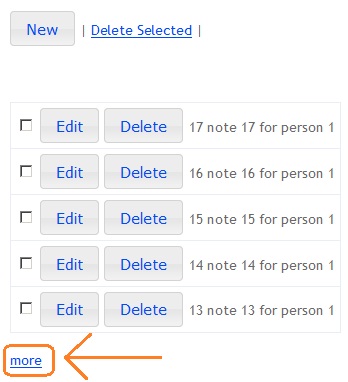
In the list view, there is a link for "more".
HTML
//

<table id="NoteTable"></table>

<br />
<a href="#"  style="display:none"  id="more">more</a>

<div id="saveDialog" title="Notes Information"></div>
<div id="confirmDialog" title="Warning"></div>

//
When "more" is clicked, the following jQuery script runs.
JavaScript
//..

   //load more results
    $(function ()
    {
        $("#more").click(function (e)
        {
            e.preventDefault();

            var lastNoteNo = $("#NoteTable tr:last .noteNo").text();

            if (lastNoteNo)
            {
                var PersonNo = $("#paginginfo .pagingPersonNo").text();
                fillData(PersonNo, lastNoteNo);
            }

            //--- scroll to bottom of page ---
            var $target = $('html,body');
            $target.animate({scrollTop: $target.height()}, "slow");
            //--- /scroll to bottom of page ---

            return false;
        });
    });

//..


   function fillData(parPersonNo, parLastNoteNo)
    {
        if (parPersonNo)
        {
            $.ajax({
                type: "POST",
                url: "@Url.Action("GetNoteList", "Note")",
                data: { personNo: parPersonNo,  lastNoteNo: parLastNoteNo} ,
                cache: false,
                dataType: "json",
                success: function (data)
                {
                    if (data.Html)
                    {
                        $("#NoteTable").append(data.Html);

                        buttonizeALL();
                        setLinkAbilites();

                        if (data.HasMore)
                            $("#more").show();
                        else
                            $("#more").hide();
                    }
                    else
                    {
                        alert('opps!');
                    }
                },
                error: function(exp)
                {
                        alert('Error address : ' + exp.responseText);
                }
            }); //end ajax call
        } // if
    }//func

// ..
The following action in the controller returns the JSON result.
C#
public class NoteController : Controller
{
   //...

    public JsonResult GetNoteList(int personNo,  int lastNoteNo)
    {
        int pageSize = 5; //it could be parameter
        bool hasMore = false;

        List<Note> list = null;

        if (lastNoteNo == 0)
        {
            list = (from x in Repository.GetNoteList() where x.PersonNo == personNo
              orderby x.NoteNo descending select x).Take(pageSize).ToList();
            hasMore = (from x in Repository.GetNoteList() where x.PersonNo ==
              personNo select x.NoteNo).Take(pageSize + 1).Count() - pageSize > 0;
        }
        else
        {
            list = (from x in Repository.GetNoteList() where x.NoteNo < lastNoteNo &&
              x.PersonNo == personNo orderby x.NoteNo descending select x).Take(pageSize).ToList();
            hasMore = (from x in Repository.GetNoteList() where x.NoteNo < lastNoteNo &&
              x.PersonNo == personNo select x.NoteNo).Take(pageSize + 1).Count() - pageSize > 0;
        }

        JsonResult jr = Json(new
        {
            Html = this.RenderPartialView("_NoteList", list),
            Message = "OK",
            HasMore = hasMore
        }, JsonRequestBehavior.AllowGet);

        return jr;
    }

  // ...
}
5) How to use attribute with link?
This is a good capability especially for buttons like edit, delete, show detail.
When creating the list, the relevant key is added to the link as an attribute. In the click event of the link, that key is used and the operation is done easily.
For example, assume that each row of a list has a delete link. When the delete link in the row is clicked, it is possible to use the key as a parameter for the "delete action" in the controller.
HTML
@Html.ActionLink("Delete", "DeletePerson", new { personNo = item.PersonNo },
  new { @class = "deleteLink", @pkNo = item.PersonNo })
When the source is inspected on the client, the following line is seen.
HTML
<a role="button" class="deleteLink ui-button ui-widget ui-state-default ui-corner-all ui-button-text-only"
  href="/Person/DeletePerson/1" pkno="1"><span class="ui-button-text">Delete</span></a>
In the jQuery script, attributes are used as follows. For example, pkno is 1 and is used.
JavaScript
$(".deleteLink").live("click", function (e)
{
      e.preventDefault();
      var pkNo = $(this).attr("pkNo");
      //..
});
6) How to make AJAX call in jQuery?
AJAX call is a very good capability to make an application faster. In some applications with a large amount of data in the database, the developer should pay attention to low amount of data transfer on two data lines. The first line is between the database and the application, and the second is between the application and the client browser. For such requirements, AJAX call is very useful.
JavaScript
//..

  $.ajax({
            type: "POST",
            url: "/Person/DeletePerson",
            data: { personNo: pkNo },
            cache: false,
            dataType: "json",
            success: function ()
            {
                       //..
            },
            error: function (jqXHR, exception)
            {
                 alert('Uncaught Error.\n' + jqXHR.responseText);
            }
         }); //end ajax call

//..
URL can also be used as follows.
JavaScript
//..

url: "@Url.Action("DeletePerson", "Person")",

// ..
7) How to use Form collection in MVC?
When a form is posted, all form elements are sent as a collection to the relevant action in the controller. Each key-value pair can be used in the controller. Assume you have a save form as follows:
HTML
@model AddressBook_mvc3_jQuery.Models.Address
@{ViewBag.Title = "Address"; }

@using (Ajax.BeginForm("Save", "Address", new AjaxOptions
                            {
                                InsertionMode = InsertionMode.Replace,
                                HttpMethod = "POST",
                                OnSuccess = "saveSuccess"
                            }, new { @id = "saveForm" }))
{
    @Html.ValidationSummary(true)
    <input style="visibility:hidden" type="text" name="TBPersonNo"
      id="idTBPersonNo" value="@Model.PersonNo"/>
    <input style="visibility:hidden" type="text" name="TBAddressNo"
      id="idTBAddressNo" value="@Model.AddressNo"/>

    <br />
    <fieldset>
        <table>
        <tr>
        <td>Address Type</td>
        <td>
          <select name="CBAddressType" id="idCBAddressType" style="width:120px">
          </select>
        </td>
        </tr>
        <tr>
        <td>Country</td>
        <td>
            <select name="CBcountry" id="idCBcountry" style="width:120px">
            </select>
        </td>
        </tr>
        <tr>
        <td>City</td>
        <td>
            <select name="CBcity" id="idCBcity" style="width:120px">
            </select>
        </td>
        </tr>
        <tr>
        <td>AddressText</td>
        <td>
        <textarea rows="4" cols="25" name="TBAddressText"
          id="idTBAddressText">@Model.AddressText</textarea>
        </td>
        </tr>
        </table>
    </fieldset>
}
Data in the view can be sent to the action in the controller as a model object or as FormCollection as shown below:
C#
//..

[HttpPost]
public JsonResult Save(FormCollection fc)
{
    object obj = null;


    Address addrTmp = new Address();
    addrTmp.AddressNo = Convert.ToInt32(fc["TBAddressNo"].ToString());
    addrTmp.AddressTypeNo = Convert.ToInt32(fc["CBAddressType"].ToString());
    addrTmp.AddressText = fc["TBAddressText"].ToString();
    addrTmp.CityNo = Convert.ToInt32(fc["CBcity"].ToString()); ;
    addrTmp.PersonNo = Convert.ToInt32(fc["TBPersonNo"].ToString());

    if (ModelState.IsValid)
    {
        if (addrTmp.AddressNo == 0)
        {
            //find last person
            //if it is database system no need to this line. Probably the AddressNo would be autoincrement
            addrTmp.AddressNo = Data.Repository.GetAddressList().OrderBy(x => x.AddressNo).Last().AddressNo + 1;

            Data.Repository.GetAddressList().Add(addrTmp);


            obj = new { Success = true,
                        Message = "Added successfully",
                        Object = addrTmp,
                        operationType = "INSERT",
                        Html = this.RenderPartialView("_addressLine", addrTmp )
                      };
        }
        else
        {
            Address addr = Repository.GetAddressList().Where(c => c.AddressNo == addrTmp.AddressNo).FirstOrDefault();
            addr.AddressTypeNo = addrTmp.AddressTypeNo;
            addr.AddressText = addrTmp.AddressText;
            addr.CityNo = addrTmp.CityNo;
            addr.PersonNo = addrTmp.PersonNo;

            obj = new { Success = true,
                        Message = "Updated successfully",
                        Object = addr,
                        operationType = "UPDATE",
                        Html = this.RenderPartialView("_addressLine",  addr )
                      };
        }

    }
    else
    {
        obj = new { Success = false, Message = "Please check form" };
    }

    return Json(obj, JsonRequestBehavior.DenyGet);
}

//..
8) How to delete multiple records at once?
In some pages, sometimes deleting many records at once makes the job easier. Deleting multiple records is possible by collecting the keys of all selected records. After all keys are sent to the controller, deletion can be performed as follows.
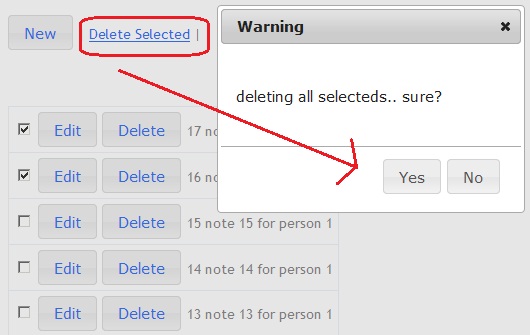
First, the "Delete Selected" button with id "deleteALL" is clicked. After pressing Yes, the following jQuery script can be used. Of course, alternative scripts can also be developed.
JavaScript
//..

$("#deleteALL").live("click", function (e)
{
    e.preventDefault();

    var len = $("#NoteTable tr").length;

    $("#confirmDialog").html('<br/><br/>deleting all selecteds.. sure?');

    $("#confirmDialog").dialog({
        resizable: false,
        height: 200,
        width: 300,
        modal: true,
        buttons:
        {
            "Yes": function ()
            {
                $(this).dialog("close");

                    var strSelecteds = '';
                    var rows = $("#NoteTable tr");

                    for(var i=0; i< rows.length; i++)
                    {
                        var row = $(rows).eq(i);

                        var span = row.find('span#cboxSpan');
                        var cb = row.find('span#cboxSpan').find('input.cboxDELclass');

                        var checked=(cb.is(':checked'));

                        var pkno =  cb.attr("pkno");

                        if (checked)
                        {
                            strSelecteds = strSelecteds + pkno + ',';
                        }
                    }//

                    if (strSelecteds.length>0)
                    {
                        strSelecteds = strSelecteds.substring(0,strSelecteds.length-1);
                    }

                    if (strSelecteds.length>0)
                    {
                        $.ajax({
                            type: "POST",
                            url: "/Note/DeleteALL",
                            data: { noteNOs: strSelecteds },
                            cache: false,
                            dataType: "json",
                            success: function (data)
                            {
                                var  strSelectedsArr = strSelecteds.split(',');
                                for (var i = 0; i < strSelectedsArr.length; i++)
                                {
                                    var rowNo = '#row-' + strSelectedsArr[i];
                                    $(rowNo).remove();
                                    //alert(strSelectedsArr[i]);

                                }//for


                                $('#saveDialog').dialog('close');
                                $('#Message').html(data.Message);
                                $('#Message').delay(300).slideDown(300).delay(1000).slideUp(300);
                            },
                            error: function(jqXHR, exception)
                            {
                                alert('Uncaught Error.\n' + jqXHR.responseText);
                            }

                        }); //end ajax call
                    }
                    else
                        alert('No row selected');

            }, // end of yes button
            "No": function ()
            {
                $(this).dialog("close");
            }
        } //end buttons
    }); //end modal

});    //end deleteALL

//...
As seen above, deleting many records is done via ajax call to the "DeleteALL" action in the "Note" controller.
9) How to use partial action in MVC?
In some cases, a component that needs to be used in many forms is required. For example, a "person info box" may be needed in some separate forms as shown below.
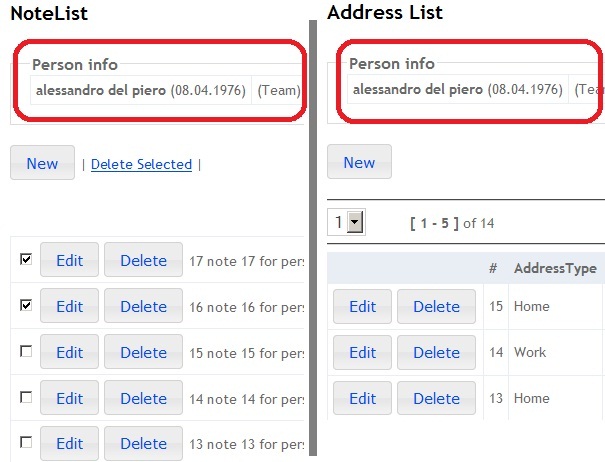
_personinfo view can be as follows.
HTML
@model AddressBook_mvc3_jQuery.Models.Person

@{ ViewBag.Title = "_personinfo"; }

<fieldset>
    <legend>Person info</legend>

    <table>
<tr><td><b><span> @Model.FirstName @Model.LastName </span></b>(@String.Format("{0:dd.MM.yyyy}",
  Model.BirthDate))</td><td>(@Model.CategoryName)</td></tr>
    </table>

</fieldset>
To use partial action in any view, the following line of code can be used.
HTML
//..

<h2>Address List</h2>
<div>
    @Html.Action("_personinfo", "Common")
</div>

//..
10) How to use JSON format in MVC application?
JSON format can be used when sending parameters to an action in the controller and getting results from an action. As shown below, the DeleteNote action in the Note controller has the noteNo parameter. Here pkNo is a parameter called with a value.
JavaScript
$(".deleteLink").live("click", function (e)
{
    e.preventDefault();

    var pkNo = $(this).attr("pkNo");

    //..

    $.ajax({
             type: "POST",
             url: "/Note/DeleteNote",
             data: { noteNo: pkNo },
             cache: false,
             dataType: "json",
             success: function ()
             {
               $(rowNo).remove();
             },
             error: function(jqXHR, exception)
             {
                alert('Uncaught Error.\n' + jqXHR.responseText);
             }
            }); //end ajax call

    //..

});    //end delete
It is possible to get JSON result from the action in the controller. The following script returns the result as a json object.
C#
//..

[HttpPost]
public JsonResult DeleteNote(int noteNo)
{

    string message = string.Empty;

    try
    {
        Note n = Data.Repository.GetNoteList().Where(c => c.NoteNo == noteNo).FirstOrDefault();

        if (n != null)
        {
            Data.Repository.GetNoteList().Remove(n);
            message = "Deleted";
        }
        else
        {
            message = "Note not found!";
        }

    }
    catch (Exception ex)
    {
        message = ex.Message;
    }

    return Json(new { Message = message }, JsonRequestBehavior.AllowGet);
}


//..
11) How to fill master-detail combobox?
Some forms require filling one combobox when another one changes. For example, for a country-city pair, country can be thought of as master and city as detail.
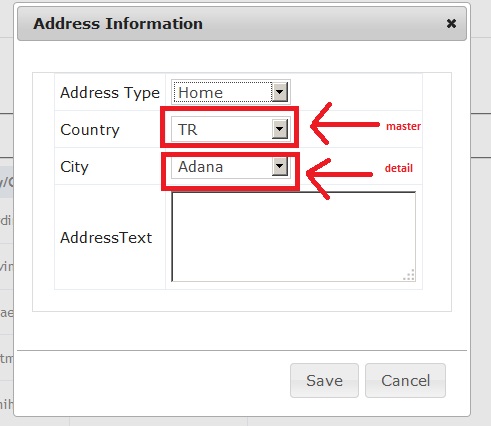
The html in the "save form" view is as follows.
HTML
@model AddressBook_mvc3_jQuery.Models.Address
@{ViewBag.Title = "Address"; }

@using (Ajax.BeginForm("Save", "Address", new AjaxOptions
                            {
                                InsertionMode = InsertionMode.Replace,
                                HttpMethod = "POST",
                                OnSuccess = "saveSuccess"
                            }, new { @id = "saveForm" }))
{
    @Html.ValidationSummary(true)
    <input style="visibility:hidden" type="text" name="TBPersonNo"
      id="idTBPersonNo" value="@Model.PersonNo"/>
    <input style="visibility:hidden" type="text" name="TBAddressNo"
      id="idTBAddressNo" value="@Model.AddressNo"/>

    <br />
    <fieldset>
        <table>
        <tr>
        <td>Address Type</td>
        <td>
          <select name="CBAddressType" id="idCBAddressType" style="width:120px">
          </select>
        </td>
        </tr>
        <tr>
        <td>Country</td>
        <td>
            <select name="CBcountry" id="idCBcountry" style="width:120px">
            </select>
        </td>
        </tr>
        <tr>
        <td>City</td>
        <td>
            <select name="CBcity" id="idCBcity" style="width:120px">
            </select>
        </td>
        </tr>
        <tr>
        <td>AddressText</td>
        <td>
        <textarea rows="4" cols="25" name="TBAddressText"
          id="idTBAddressText">@Model.AddressText</textarea>
        </td>
        </tr>
        </table>
    </fieldset>
}
On first load, the idCBCountry combobox is filled using the "GetCountryList" action in the Address controller. Then when the country combobox changes, the city combobox is filled as follows.
JavaScript
<script type="text/javascript">

    $(document).ready(function () {

    //...
    //-----------------------------------------------------


   $.ajax({
        type: "POST",
        url: "@Url.Action("GetCountryList", "Address")",
        data: {},
        cache: false,
        dataType: "json",
        success: function (data)
        {
             var idCBcountry = $("#idCBcountry");
             idCBcountry.html("");

              if (@Model.AddressNo>0)
              {
                 for (var i = 0; i < data.List.length; i++)
                 {
                    var item = data.List[i];

                    if (item.CountryNo == @Model.CountryNo)
                    {
                        idCBcountry.append($("<option selected></option>").val(item.CountryNo).text(item.CountryName));
                        fillCity(item.CountryNo);
                    }
                    else
                    {
                        idCBcountry.append($("<option />").val(item.CountryNo).text(item.CountryName));
                    }
                 }  //for
              }
              else
              {
                    for (var i = 0; i < data.List.length; i++)
                     {
                        var item = data.List[i];
                        if (i==0)
                        {
                            idCBcountry.append($("<option selected></option>").val(item.CountryNo).text(item.CountryName));
                            fillCity(item.CountryNo);
                        }
                        else
                        {
                            idCBcountry.append($("<option />").val(item.CountryNo).text(item.CountryName));
                        }
                     }  //for
              }//else
            },
            error: function(exp)
            {
                 alert('ErrorCountry : ' + exp.responseText);
            }
        });

        //-----------------------------------------------------

            $("#idCBcountry").change(function () {
                var $this = $(this);
                var CountryNo = $this.val();
                if (CountryNo)
                {
                    fillCity(CountryNo);

                }//if
            });

            //-----------------------------------------------------

});//end of function

function fillCity(parCountryNo)
{

    $.ajax({
        type: "POST",
        url: "@Url.Action("GetCityList", "Address")",
        data: {CountryNo: parCountryNo},
        cache: false,
        dataType: "json",
        success: function (data)
        {
             var idCBcity = $("#idCBcity");
             idCBcity.html("");

             for (var i = 0; i < data.List.length; i++)
             {
                var item = data.List[i];

                if (item.CityNo == @Model.CityNo)
                {
                    idCBcity.append($("<option selected></option>").val(item.CityNo).text(item.CityName));
                }
                else
                {
                    idCBcity.append($("<option />").val(item.CityNo).text(item.CityName));
                }
             }
        },
        error: function(exp)
        {
             alert('ErrorCity : ' + exp.responseText);
        }
    });
}//fillCity

</script>
The action codes are as follows. Lists are embedded in the json object. Then, in the jQuery script shown above, list elements are used with index.
C#
public class AddressController : Controller
{
    //..

    public JsonResult GetCountryList()
    {
        object obj = null;
        List<Country> list = Repository.GetCountryList();
        obj = new { Success = true, Message = "OK", List = list };

        return Json(obj, JsonRequestBehavior.AllowGet);
    }

    public JsonResult GetCityList(int CountryNo)
    {
        object obj = null;

        List<City> list = Repository.GetCityList().Where(c => c.CountryNo == CountryNo).ToList(); ;
        obj = new { Success = true, Message = "OK", List = list };

        return Json(obj, JsonRequestBehavior.AllowGet);
    }

   //..
}
This technique can be used for any html element in the view form.
12) How to use jQuery datepicker?
Date type is used in almost all business applications. Due to cultural differences, sometimes using this type means a problem for the developer. However, jQuery datepicker makes it easy to use date type.
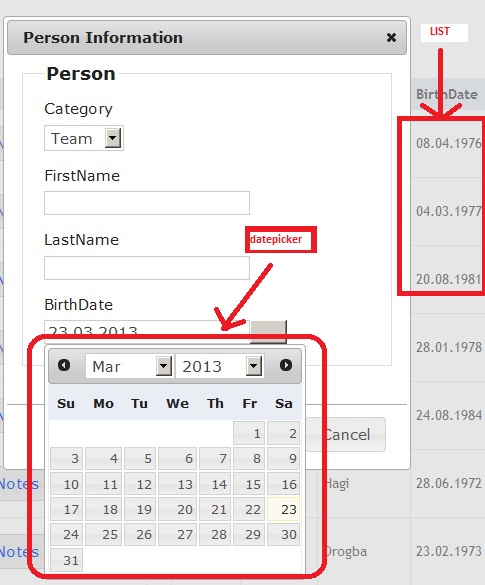
To display the date in the desired format in the list, the following line can be used.
HTML
<span class="BirthDate"> @String.Format("{0:dd.MM.yyyy}", item.BirthDate) </span>
In the save form, the following html script is used.
HTML
  ...

    <div class="editor-label">
        @Html.LabelFor(model => model.BirthDate)
    </div>
    <div class="editor-field">
        @Html.TextBoxFor(model => model.BirthDate,
                new { @class = "BirthDateSave",
                      @id = "TBBirthDate",
                      @Value = Model.BirthDate.ToString("dd.MM.yyyy")
                    })
    </div>

   ...
jQuery Datepicker can work with @Html.TextboxFor with the following script on the same page.
JavaScript
<script language="javascript" type="text/javascript">

 $(document).ready(function () {
    $(".BirthDateSave").datepicker({
             changeMonth: true,
             changeYear: true,
             dateFormat: 'dd.mm.yy',
             showOn: 'both'
                   });
                });

</script>
The following lines should be included at the beginning of the appropriate .cshtml.
HTML
..
  <link href="@Url.Content("~/Content/themes/base/jquery.ui.all.css")" rel="stylesheet" type="text/css" />
  <script src="@Url.Content("~/Scripts/jquery-1.5.1.min.js")" type="text/javascript"></script>
  <script src="@Url.Content("~/Scripts/jquery-ui-1.8.11.min.js")" type="text/javascript"></script>
..
13) How to upload image in MVC with jQuery dialog?
An image can be easily uploaded in a separate view. However, redirecting to a separate view just to upload an image and then redirecting to the list view may be cost inefficient. Instead, in the list view, a jQuery dialog can be opened by clicking the upload link in each row, an image can be browsed and uploaded.
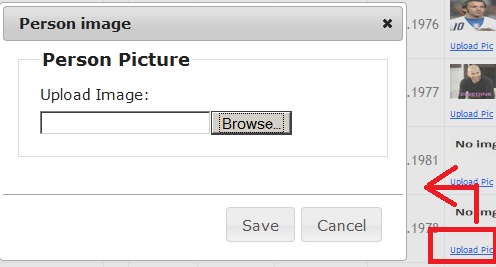
When "Upload Pic" is clicked, the following script runs.
JavaScript
//..

$(".uploadPicLink").click
(
    function ()
    {

        linkObj = $(this);

        var dialogDiv = $('#savePicDialog');
        var viewUrl = linkObj.attr('href');
        $.get(viewUrl, function (data) {
            dialogDiv.html(data);
            //validation
            var $form = $("#savePersonPicForm");
            $form.unbind();
            $form.data("validator", null);
            $.validator.unobtrusive.parse(document);
            $form.validate($form.data("unobtrusiveValidation").options);

            dialogDiv.dialog('open');
        });

        return false;
    }
);

//..
The SavePersonPic form loaded into the jQuery dialog is as follows. An iframe is used to upload files in jQuery dialog.
HTML
@model AddressBook_mvc3_jQuery.Models.Person
@{ViewBag.Title = "Save image";}

@using (Html.BeginForm("SavePersonPic", "Person", FormMethod.Post,
             new
             {
                enctype = "multipart/form-data",
                id = "savePersonPicForm",
                name = "savePersonPicForm",
                target = "UploadTarget"
              }))
{
    @Html.ValidationSummary(true)

    <div id="update-message" class="error invisible"></div>
    <fieldset>
        <legend>Person Picture</legend>
        <div class="editor-label">
            <label for="file">Upload Image:</label>
        </div>
        <div class="editor-field">
            <input type="file" name="file" id="file"/>
        </div>

    </fieldset>
}

<iframe id="UploadTarget"
   name="UploadTarget" onload="UploadImage_Complete();"
        style="position: absolute; left: -999em; top: -999em;">
</iframe>
The file upload action in the controller is below:
C#
public class PersonController : Controller
{
    //..
    //-------------- image -----

    [HttpGet]
    public ActionResult SavePersonPic(int personNo)
    {

        Person person = new Person();

        if (personNo > 0)
        {
            person = Repository.GetPersonList().Where(c => c.PersonNo == personNo).FirstOrDefault();
        }

        return PartialView(person);
    }

    [HttpPost]
    public JsonResult SavePersonPic(HttpPostedFileBase file,   int personNo)
    {
        string message = string.Empty;
        bool success = false;
        string imgPath = "";
        string fileName = "";
        try
        {
            string path = System.IO.Path.Combine(Server.MapPath("~/Content/images"),
                            System.IO.Path.GetFileName(file.FileName));
            file.SaveAs(path);

            Person p = Data.Repository.GetPersonList().Where(r => r.PersonNo == personNo).FirstOrDefault();
            p.imgFileName = file.FileName;
            ViewBag.Message = "File uploaded successfully";
            message = ViewBag.Message;

            fileName = file.FileName;
            imgPath = Url.Content(String.Format("~/Content/images/{0}", fileName));

            success = true;

        }
        catch (Exception ex)
        {
            message = ex.Message;
            success = true;
            imgPath = "";
            fileName = "";
        }

        return Json(
                        new { Success = success,
                              Message = message,
                              PersonNo=personNo,
                              ImagePath = imgPath,
                              FileName = fileName
                            },
                        JsonRequestBehavior.AllowGet
                    );

    }

    //------------- /image --------
    // ..
}
The JavaScript "onload" function of the iframe is below. The uploaded image is displayed in the relevant row of the list without refreshing the row.
JavaScript
//..

function UploadImage_Complete()
{
    //Check first load of the iFrame
    if (isFirstLoad == true)
    {
        isFirstLoad = false;
        return;
    }

    try
    {
        //Reset the image form
        document.getElementById("savePersonPicForm").reset();

        var jsonTxt = ($('#UploadTarget').contents()).text();
        var jsonObj = JSON.parse(jsonTxt);

        var rowid = '#row-' + jsonObj.PersonNo;
        var row = $('#personTable ' + rowid);
        var imgid = "#img-" + jsonObj.PersonNo;
        var img = row.find(imgid);
            $(img).attr("src", jsonObj.ImagePath);


        $('#Message').html(jsonObj.Message);
        $('#Message').delay(300).slideDown(300).delay(1000).slideUp(300)


        $('#savePicDialog').dialog('close');
    }
    catch (err)
    {
        alert(err.get_Message());
    }
}

//..
14) How to create table row on client side?
A record added to the database should be displayed in the list on the client side. This can be done in many ways. After a record is added, the list can be completely refreshed from the database but this is a heavy operation. However, using javascript or jquery, a new row can be added to the view without refreshing all elements in the view. Two ways are mentioned here.
First, the row and cells of the row are created one by one with javascript below. As seen in the scripts below, the saveSuccess JavaScript function is used for such a scenario after submit of this form.
HTML
..

@model AddressBook_mvc3_jQuery.Models.Person

@{  ViewBag.Title = "Save Person"; }

..

@using (Ajax.BeginForm("Save", "Person", new AjaxOptions
{
    InsertionMode = InsertionMode.Replace,
    HttpMethod = "POST",
    OnSuccess = "saveSuccess"
}, new { @id = "savePersonForm" }))
{
    @Html.ValidationSummary(true)

    ..
}

..
The saveSuccess javascript method is as follows. The action returns a json result containing the operation type. According to the operation, i.e. INSERT or UPDATE, the table in the view is modified. When a new record is added to the database, a new row is prepended to the table. When an existing record in the database is updated, only the relevant row in the table is changed.
JavaScript
function saveSuccess(data)
{
    if (data.Success == true)
    {
        if (data.operationType == 'UPDATE')
        {
            //we update the table's row info
            var parent = linkObj.closest("tr");

            $(parent).animate({ opacity: 0.3 }, 200, function ()
            {;});

            parent.find(".FirstName").html(data.Object.FirstName);
            parent.find(".LastName").html(data.Object.LastName);
            parent.find(".CategoryName").html(data.Object.CategoryName);

            var date = new Date(parseInt(data.Object.BirthDate.substr(6)));
            var dateStr = FormatDate(date);
            parent.find(".BirthDate").html(dateStr);


            $(parent).animate({ opacity: 1.0 }, 200, function () {
                ;
            });

        }
        else
        {  //INSERT

            //we add the new row to table
            //we do not refresh all records on screen

            try
            {
                var personTable = document.getElementById("personTable");
                var row = personTable.insertRow(1); //row 0 is header
                row.setAttribute("id", 'row-' + data.Object.PersonNo.toString());

                var buttonsLinks =
                '<a role="button" class="editLink ui-button ui-widget ui-state-default ui-corner-all ui-button-text-only ui-state-hover ui-state-focus" href="/Person/Save/' + data.Object.PersonNo.toString() + '"><span class="ui-button-text">Edit</span></a> ' +
                '<a role="button" class="adressLink ui-button ui-widget ui-state-default ui-corner-all ui-button-text-only" href="/Address/Index/' + data.Object.PersonNo.toString()  + '"><span class="ui-button-text">Addresses</span></a> ' +
                '<a role="button" class="noteLink ui-button ui-widget ui-state-default ui-corner-all ui-button-text-only" href="/Note/Index/' + data.Object.PersonNo.toString() + '"><span class="ui-button-text">Notes</span></a> ' +
                '<a role="button" class="deleteLink ui-button ui-widget ui-state-default ui-corner-all ui-button-text-only" href="/Person/Delete/' + data.Object.PersonNo.toString() + '" pkno="' + data.Object.PersonNo.toString()  + '"><span class="ui-button-text">Delete</span></a>';


                var cellButtons = row.insertCell(0);
                cellButtons.innerHTML = buttonsLinks;

                var cellPersonNo = row.insertCell(1);
                cellPersonNo.innerHTML = "<span  class=\"PersonNo\">" + data.Object.PersonNo + "</span>";


                var cellCategoryName = row.insertCell(2);
                cellCategoryName.innerHTML = "<span  class=\"CategoryName\">" + data.Object.CategoryName + "</span>";

                var cellFN = row.insertCell(3);
                cellFN.innerHTML = "<span  class=\"FirstName\">" + data.Object.FirstName + "</span>";

                var cellLN= row.insertCell(4);
                cellLN.innerHTML = "<span  class=\"LastName\">" + data.Object.LastName + "</span>";

                var cellBirthDate = row.insertCell(5);
                var date = new Date(parseInt(data.Object.BirthDate.substr(6)));
                var dateStr = FormatDate(date);
                cellBirthDate.innerHTML = "<span  class=\"BirthDate\">" + dateStr + "</span>";

                var cellimgFileName = row.insertCell(6);
                cellimgFileName.innerHTML =
                    "<img id=\"img-" + data.Object.PersonNo.toString() + "\" alt=\"" + data.Object.ImgFileName + "\" src=\"/content/images/" + "noimg.jpg" + "\" height=\"35px\" width=\"50px\"><br><a class=\"uploadPicLink\" href=\"/Person/SavePersonPic/" + data.Object.PersonNo.toString() + "\" pkno=\"" + data.Object.PersonNo.toString() + "\" style=\"font-size:9px;\">Upload Pic</a>";


                setLinks();

            }
            catch (err) {
                alert(err.Message);
            }
        }

        $('#saveDialog').dialog('close');
        $('#Message').html(data.Message);
        $('#Message').delay(300).slideDown(300).delay(1000).slideUp(300);

    }
    else {
        $("#update-message").html(data.ErrorMessage);
        $("#update-message").show();
    }
}
The first way mentioned above may seem like an old approach. Therefore, the following second way may be more applicable. In this way, rendered html is used to add or update a row to the table. Assume you have a table as follows.
HTML
@model IEnumerable<AddressBook_mvc3_jQuery.Models.Address>

<table id="AddressTable">
    <tr>
        <th></th>
        <th>
            #
        </th>
        <th>
            AddressType
        </th>
        <th>
            City/Country
        </th>
        <th>
            Address Text
        </th>
    </tr>

@foreach (var item in Model)
{
    <tr id="row-@item.AddressNo">
        <td>
            @Html.ActionLink("Edit", "Save",
              new { addressNo = item.AddressNo, personNo = item.PersonNo }, new { @class = "editLink" })
            @Html.ActionLink("Delete", "DeleteAddress",
              new { addressNo = item.AddressNo }, new { @class = "deleteLink", @pkNo = item.AddressNo })
        </td>
        <td>
            <span class="AddressNo">@item.AddressNo</span>
        </td>
        <td>
            <span class="AddressTypeName">@item.AddressTypeName</span>
        </td>
        <td>
            <span class="CityName">@item.CityName/@item.CountryName</span>
        </td>
        <td>
            <span class="AddressText">@item.AddressText</span>
        </td>
    </tr>
}

</table>
When "new" is clicked, the following script is loaded into the jQuery dialog.
HTML
@model AddressBook_mvc3_jQuery.Models.Address
@{ViewBag.Title = "Address"; }

@using (Ajax.BeginForm("Save", "Address", new AjaxOptions
                            {
                                InsertionMode = InsertionMode.Replace,
                                HttpMethod = "POST",
                                OnSuccess = "saveSuccess"
                            }, new { @id = "saveForm" }))
{
    @Html.ValidationSummary(true)
    <input style="visibility:hidden" type="text"
      name="TBPersonNo" id="idTBPersonNo" value="@Model.PersonNo"/>
    <input style="visibility:hidden" type="text"
      name="TBAddressNo" id="idTBAddressNo" value="@Model.AddressNo"/>

    <br />
    <fieldset>
        <table>
        <tr>
        <td>Address Type</td>
        <td>
          <select name="CBAddressType" id="idCBAddressType" style="width:120px">
          </select>
        </td>
        </tr>
        <tr>
        <td>Country</td>
        <td>
            <select name="CBcountry" id="idCBcountry" style="width:120px">
            </select>
        </td>
        </tr>
        <tr>
        <td>City</td>
        <td>
            <select name="CBcity" id="idCBcity" style="width:120px">
            </select>
        </td>
        </tr>
        <tr>
        <td>AddressText</td>
        <td>
        <textarea rows="4" cols="25" name="TBAddressText"
              id="idTBAddressText">@Model.AddressText</textarea>
        </td>
        </tr>
        </table>
    </fieldset>
}
When the form is submitted, the following action in the controller runs.
C#
public class AddressController : Controller
{

    //..

    [HttpPost]
    public JsonResult Save(FormCollection fc)
    {
        object obj = null;

        Address addrTmp = new Address();
        addrTmp.AddressNo = Convert.ToInt32(fc["TBAddressNo"].ToString());
        addrTmp.AddressTypeNo = Convert.ToInt32(fc["CBAddressType"].ToString());
        addrTmp.AddressText = fc["TBAddressText"].ToString();
        addrTmp.CityNo = Convert.ToInt32(fc["CBcity"].ToString()); ;
        addrTmp.PersonNo = Convert.ToInt32(fc["TBPersonNo"].ToString());

        if (ModelState.IsValid)
        {
            if (addrTmp.AddressNo == 0)
            {
                //find last person
                //if it is database system no need to this line. Probably the AddressNo would be autoincrement
                addrTmp.AddressNo = Data.Repository.GetAddressList().OrderBy(x => x.AddressNo).Last().AddressNo + 1;

                Data.Repository.GetAddressList().Add(addrTmp);

                obj = new { Success = true,
                            Message = "Added successfully",
                            Object = addrTmp,
                            operationType = "INSERT",
                                Html = this.RenderPartialView("_addressLine", addrTmp )
                          };
            }
            else
            {
                Address addr = Repository.GetAddressList().Where(c => c.AddressNo == addrTmp.AddressNo).FirstOrDefault();
                addr.AddressTypeNo = addrTmp.AddressTypeNo;
                addr.AddressText = addrTmp.AddressText;
                addr.CityNo = addrTmp.CityNo;
                addr.PersonNo = addrTmp.PersonNo;

                obj = new { Success = true,
                            Message = "Updated successfully",
                            Object = addr,
                            operationType = "UPDATE",
                                Html = this.RenderPartialView("_addressLine",  addr )
                          };
            }

        }
        else
        {
            obj = new { Success = false, Message = "Please check form" };
        }

        return Json(obj, JsonRequestBehavior.DenyGet);
    }

    // ..

}
The RenderPartialView method is used to get the requested html script.
C#
//..

public static string RenderPartialView(this Controller controller, string viewName, object model)
{
    if (string.IsNullOrEmpty(viewName))
        viewName = controller.ControllerContext.RouteData.GetRequiredString("action");

    controller.ViewData.Model = model;
    using (var sw = new StringWriter())
    {
        ViewEngineResult viewResult = ViewEngines.Engines.FindPartialView(controller.ControllerContext, viewName);
        var viewContext = new ViewContext(controller.ControllerContext,
               viewResult.View, controller.ViewData, controller.TempData, sw);
        viewResult.View.Render(viewContext, sw);

        return sw.GetStringBuilder().ToString();
    }
}

//..
The saveSuccess function of the ajax post from the saveAddress form is as follows:
JavaScript
<script type="text/javascript">

    //...

    function saveSuccess(data)
    {
        if (data.Success == true)
        {
            $("#paginginfo").show();

            if (data.operationType == 'UPDATE')
            {
                var row = linkObj.closest("tr");

                // the following line can also be used  to get related row
                //$('#AddressTable #row-' + data.Object.AddressNo);

                row.replaceWith(data.Html);
                //..
            }
            else
            {  //INSERT

                try
                {
                      $("#AddressTable tr:first").after(data.Html);

                     //..

                }
                catch (err)
                {
                       alert(err.Message);
                }
            }

            //..

        }
        else
        {
           //..
        }
    }

    //..

</script>
Either of the two techniques described above can be used.
15) How to customize mapRoute in Global.asax?
In classic asp.net application, urlRewrite operations were easily done with some third party assemblies. In MVC application, it is possible to customize mapRoutes using Global.asax.
The following mapRoute is the default in Global.asax:
C#
public class MvcApplication : System.Web.HttpApplication
{

    //..

    public static void RegisterRoutes(RouteCollection routes)
    {

       // all new customized maproute rules can be put here


        routes.MapRoute(
            "Default", // Route name
            "{controller}/{action}/{id}", // URL with parameters
            new { controller = "Home", action = "Index", id = UrlParameter.Optional } // Parameter defaults
        );

    }

    //  ..
}
According to the following script,
**/Save/{addressNo}/{personNo}** is used as a link.HTML
@Html.ActionLink("Edit", "Save",
  new { addressNo = item.AddressNo, personNo = item.PersonNo }, new { @class = "editLink" })
The screenshot of the above link is below.
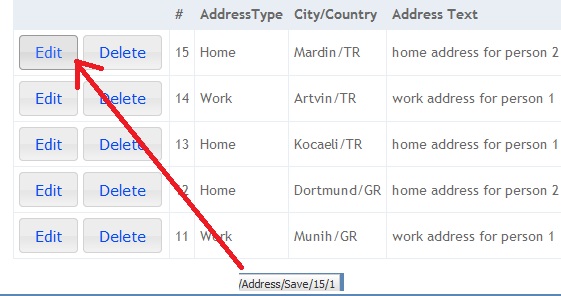
Therefore, it is possible to add a customized mapRoute rule to Global.asax as follows.
C#
//..

routes.MapRoute(
    "AddressSave",
    "Address/Save/{addressNo}/{personNo}",
    new { controller = "Address", action = "Save",
         addressNo = UrlParameter.Optional, personNo = UrlParameter.Optional }
);

//..
Either of the two techniques described above can be used.
16) How to checkALL and uncheckALL all rows of a table?
In many applications, it may be desired to check or uncheck all checks in a table at once.
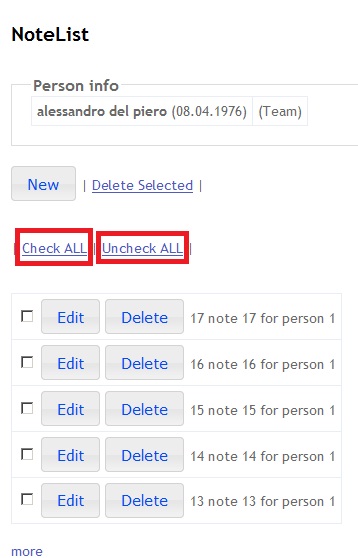
The following script can be used for such a function.
HTML
..

<br />
| <a href="#" class="checkALLRecords" id="checkALL">Check ALL</a> | <a href="#" class="unCheckALLRecords" id="unCheckALL">Uncheck ALL</a> |
<br />

..

<table id="NoteTable"></table>
..
JavaScript
//..


        //check ALL records
        $("#checkALL").live("click", function (e)
        {
                e.preventDefault();
                CheckALL(true);
        });

        //uncheck ALL records
        $("#unCheckALL").live("click", function (e)
        {
                e.preventDefault();
                CheckALL(false);
        });


//..

    function CheckALL(state)
    {
                            var rows = $("#NoteTable tr");


                            for(var i=0; i< rows.length; i++)
                            {
                                var row = $(rows).eq(i);

                                var span = row.find('span#cboxSpan');
                                var cb = row.find('span#cboxSpan').find('input.cboxDELclass');

                                if (state==true)
                                    cb.attr('checked',true);
                                else
                                    cb.attr('checked',false);
                            }
    }


//..
17) How to do "Loading Data"?
When loading multiple data rows, a "loading data" message should be shown to users.
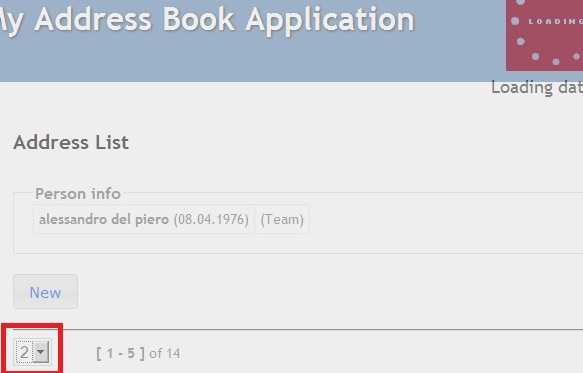
The following div can be customized according to the required message.
HTML
..
<div id="loadMessage"></div>
..
The following javascript function can be used to customize the div area.
JavaScript
..
function showLoader(root, txt) {
$("#loadMessage").html("");
$("#loadMessage").show();
var loader = '<img src="' + root + '/ajax-loader.gif" align="absmiddle">&nbsp;<span><br/>' + txt + '...</span>';
$("#loadMessage").fadeIn(100).html(loader);
}
function hideLoader() {
$("#loadMessage").hide();
}
..
18) How to make master-detail grids with jQuery?
When a master row is clicked, detail rows are shown below the master grid as shown below.
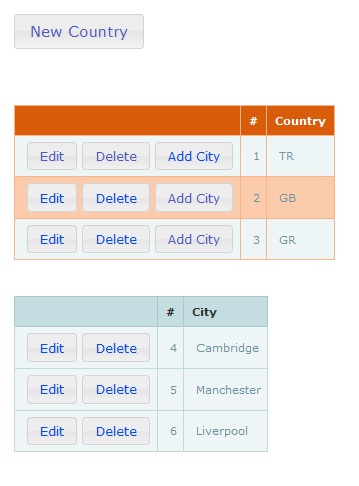
The following tables are used as grids.
HTML
..
<table id="CountryTable" class="hovertable2"></table>
<br />
<br />

<table id="CityTable" class="hovertable"></table>
..
The following javascript functions are used to simulate the master-detail approach.
JavaScript
..

 function setTableRowClick()
   {

        $("#CountryTable tr  td.clickable").unbind('click');

        $('#CountryTable  tr  td.clickable').click(function ()
        {
             var row = $(this).parent();
             setRow(row);

        });

        //-------------


   }//func


   function setRow(row)
   {
              var rowid = row.attr('id'); //current

              var higlightedCountryTableRowid = $("#pageinfo .higlightedCountryTableRowid").text();

               $("#pageinfo .higlightedCountryTableRowid").html(rowid.toString());

              if ((rowid==0) || (rowid!=higlightedCountryTableRowid))
              {
                  //------
                    row.siblings().removeClass('diffColor');
                    row.addClass("diffColor");
                  //-------

                 fillCityData(rowid);
             }

   }


..

    function fillCountryData()
    {
            $.ajax({
                type: "POST",
                url: "@Url.Action("GetCountryList", "Country")",
                data: {},
                cache: false,
                dataType: "json",
                success: function (data)
                {
                    if (data.Html)
                    {
                        $("#CountryTable").html(data.Html);

                        buttonizeALL();

                        setLinkAbilitesCountry();
                        setLinkAbilitesCity();


                        setTableRowClick();

                    }
                    else
                    {
                        alert('opps-- country list error!');
                    }
                },
                error: function(exp)
                {
                         alert('Error address : ' + exp.responseText);
                }
            }); //end ajax call


    }//func


    function fillCityData(parCountryNo)
    {
            $.ajax({
                type: "POST",
                url: "@Url.Action("GetCityList", "Country")",
                data: { countryNo: parCountryNo},
                cache: false,
                dataType: "json",
                success: function (data)
                {
                    if (data.Html)
                    {
                        $("#CityTable").html(data.Html);


                        buttonizeALL();
                        setLinkAbilitesCity();
                        setTableRowClick();

                    }
                    else
                    {
                        alert('opps-- city list error!');
                    }
                },
                error: function(exp)
                {
                         alert('Error address : ' + exp.responseText);
                }
            }); //end ajax call


    }//func

..
Conclusion
I hope this has been a useful article.
Cloud Computing Services
We offer infrastructure design, migration, management and optimization services on AWS, Azure and Google Cloud platforms.
Explore Our Service